
IRS2Go
Internal Revenue ServiceFinance
4.019.58K Reviews
- Version
- 6.3.5
- Installs
- 10.00M
- Age Rating
- Everyone
Screenshots


Our Review of IRS2Go
 Analysis by Appyee
I find tax apps most useful when they answer one narrow question without asking me to learn a whole new system. That is the practical appeal of IRS2Go: it gives people a mobile route to a few common tasks connected with the Internal Revenue Service. It is a free finance app from the IRS, and its focused approach makes more sense to me than trying to turn a phone into a complete tax-preparation office.
Where people can get stuck
The first friction point is often not the app itself but the information a task requires. A refund-status check depends on entering details that need to match the filed return, including the refund amount. If I have the wrong figure in front of me, or confuse a refund with the amount owed, repeated attempts are unlikely to help. I would check the completed return carefully before trying again rather than guessing.
That makes the app handy for a quick status check, but less forgiving than a general account dashboard that keeps a user signed in. IRS2Go does not require a login, which helps keep a one-off visit simple; the trade-off is re-entering information when returning. I would treat that as a deliberate convenience-versus-continuity choice, not as a flaw that can be fixed by saving sensitive details somewhere casually.
Simple setup checks before trying again
When a screen does not behave as expected, I start with basic checks: make sure I have the current app version, confirm the phone has a working connection, and review each entry against the relevant tax document. The current version is 5.6.10, and the app supports devices running Android 7.0 or later. Those are useful compatibility checks before assuming that a tax record or refund request is the problem.
For a privacy-conscious setup, I also avoid entering tax details while someone else can see my screen and make sure I am using the official IRS app rather than an app with a similar name. The developer is the Internal Revenue Service. Since this is a government-service app, I would use it for its stated IRS tasks, not as a place to store copies of documents or as a substitute for keeping my own tax records organized.
Recovering a stalled workflow
If a refund lookup fails, I would pause and verify the filing status and exact refund amount on the return before submitting the request again. If the figures are correct but the status still does not give a useful answer, repeating the same check immediately may not add anything. The more sensible next move is to use the IRS assistance options available through the app and decide whether the question needs direct help.
For payments, I would slow down at the confirmation stage and check the details before completing anything. A mobile payment is convenient, but convenience is not a reason to rush a financial action. I would keep the confirmation for my records and compare it with my own notes later, particularly if I am managing more than one tax obligation. That small habit makes it easier to distinguish a completed task from one I only started.
When the app may not be the cause
It is easy to blame an app when a tax question remains unresolved, but IRS2Go is a compact access point, not a tax adviser or a full preparation service. If I need help deciding how to report income, understand a complicated notice, or plan a filing, a status lookup cannot settle the underlying issue. The app’s assistance links can point me toward IRS help, while a qualified tax professional may be a better fit for advice about an individual situation.
Likewise, a missing or confusing result does not automatically mean the phone is broken. The issue may be an entry mismatch, a network interruption, or a question that needs a different IRS channel. I find it useful to separate these possibilities: check the connection and the details once, then move to appropriate assistance instead of endlessly reinstalling or resubmitting information.
That distinction is especially helpful for people who only need to check a refund or make a straightforward payment. Someone who wants year-round budgeting, expense categorization, document storage, or detailed filing guidance will probably be better served by a dedicated finance or tax-preparation tool. Those alternatives cover a broader job; IRS2Go is more appealing when the task is specifically an IRS interaction.
For everyday use, I would open the app with one question in mind, complete that task, and then close it rather than treating it as a general tax workspace. If I am checking a return while away from home, I would have the relevant information ready first and avoid trying to reconstruct figures from memory. That workflow cuts down on avoidable input errors and keeps a quick check genuinely quick.
With an average rating of 4.0 from around 74,000 ratings and over 10 million installs, IRS2Go has clearly reached many people looking for mobile access to IRS services. It is rated for everyone and has been available since January 18, 2011. Those broad adoption figures are reassuring context, but they do not guarantee that every task will be effortless or that the app is right for every tax situation.
The app is a particularly sensible choice for someone who already has a filed return and wants a straightforward way to check a refund, arrange a payment, or request tax records. It is less suited to someone who expects personalized tax explanations or wants all financial paperwork gathered in one place. Knowing that boundary before downloading it helps set realistic expectations.
Ever wondered how to keep tabs on your tax refund status without having to navigate the labyrinth of IRS paperwork? Well, let me introduce you to IRS2Go, the official mobile app of the Internal Revenue Service. It's like having a personal tax assistant right in your pocket. I decided to give it a whirl, and here’s what I found.
Getting Started with IRS2Go
First off, downloading the app is a breeze. Available for both Android and iOS, it’s just a tap away on the Google Play Store or Apple App Store. Once installed, the app sports a clean and straightforward interface, which is refreshing amidst the usual complexity associated with anything tax-related.
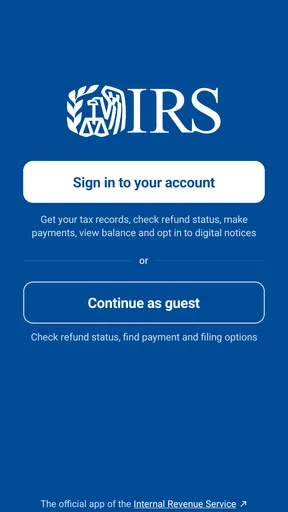
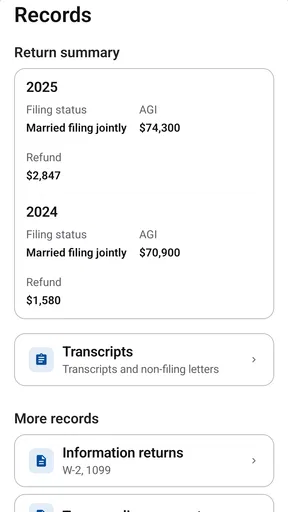
Upon launching, you’ll notice that IRS2Go is designed with simplicity in mind. The app doesn’t bombard you with unnecessary info; instead, it focuses on the essentials. The main menu offers three primary functions: checking your refund status, making a payment, and obtaining tax records.
Checking Your Refund Status
This feature is arguably the star of the show. You just need to enter your Social Security number, filing status, and the exact refund amount from your tax return. A few taps, and you can see where your refund stands. It’s super handy, especially if you’re like me and tend to get a bit impatient waiting for that deposit.
Making Payments
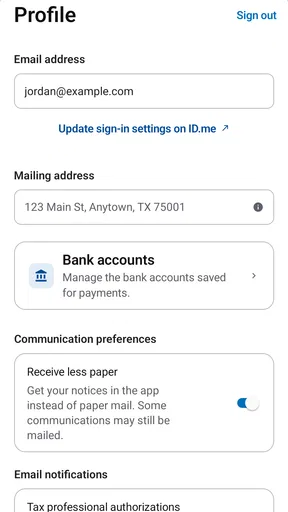
For those who need to make a payment, the app supports direct payments using your bank account. No more writing checks or worrying about postal delays. It’s convenient and reduces the hassle of dealing with snail mail. Plus, it provides a confirmation for peace of mind.
Accessing Tax Records
If you ever need to peek at your tax history, IRS2Go simplifies the process of requesting tax transcripts. It’s a straightforward way to keep all your ducks in a row, especially during the tax season when you might need to review past returns.
What Makes IRS2Go Stand Out?
One thing I really like about the app is its security features. Given the sensitive nature of tax information, the developers have ensured that data privacy is a top priority. The app doesn’t store your Social Security number or refund information, which is a big plus in today’s digital age.
Moreover, IRS2Go doesn’t require a login, making it faster to access on the go. However, this also means you need to input your details every time you want to check your status or make a payment. For me, the trade-off in speed is worth it, but it’s something to consider if you prefer a more integrated approach.
Support and Assistance
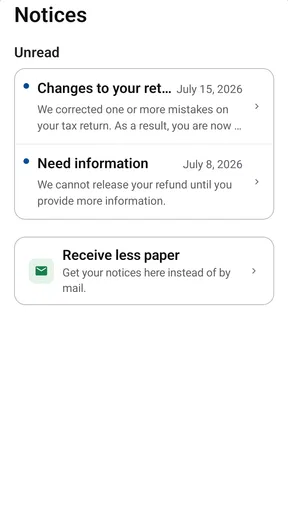
If you run into any hiccups, the app provides useful links to IRS assistance, including the option to call or connect with the IRS on social media. It’s like having a direct line to tax experts, which can be a lifesaver if you’re stuck with a tricky tax question.
Final Thoughts on IRS2Go
In conclusion, IRS2Go is a must-have app for anyone navigating the world of taxes. It’s user-friendly, secure, and offers the essential features you need to manage your tax information effortlessly. While it’s not packed with bells and whistles, its simplicity is its strength, making tax management less daunting.
So, if you’re looking for a reliable way to keep tabs on your tax matters, give IRS2Go a try. It’s a small app that makes a big difference during the tax season. Plus, who doesn’t love the ease of checking their refund status while sipping coffee at a café?
Verdict
Strengths of IRS2Go
- User-friendly interface, easy to navigate.
- Quick access to tax refund status.
- Secure login with multi-factor authentication.
- Supports multiple languages for accessibility.
- Free to download and use, no hidden fees.
Limitations of IRS2Go
- Limited functionality outside tax season.
- Requires stable internet connection.
- No in-app customer support chat.
- Interface updates can be slow.
- Not available in all countries.
Similar Picks in This Category
View All
Google Wallet
Google LLC4.3

Airtel: Recharge, Bank & Loans
Airtel4.0

PayPal - Pay, Send, Save
PayPal Mobile4.2

DANA Indonesia Digital Wallet
PT Espay Debit Indonesia Koe4.5

Binance: Buy Bitcoin & Crypto
Binance Inc.4.8

Cash App
Block, Inc.4.7
Frequently Asked Questions
What features does IRS2Go offer?
IRS2Go provides multiple features to simplify tax management. Users can check the status of their federal tax refund, make payments, and access free tax help directly from their mobile devices. Additionally, it offers secure login options and provides tax tips and updates, ensuring users stay informed of any changes.
Is IRS2Go safe to use for my tax information?
Yes, IRS2Go is a secure app developed by the Internal Revenue Service. It uses encryption and secure login features to protect your personal information. The app ensures that your sensitive data, such as your Social Security Number and tax details, remain confidential and safe from unauthorized access.
Can I file my taxes directly through IRS2Go?
No, IRS2Go does not allow you to file taxes directly. However, it provides links to free tax preparation help and guides users to IRS-approved e-file providers. The app is primarily designed to help you track refunds, make payments, and get tax-related information and assistance.
How often is the refund status updated on IRS2Go?
The refund status is updated once every 24 hours, usually overnight. Users can check their refund status 24 hours after e-filing their return or 4 weeks after mailing a paper return. This ensures users have the most current information available regarding their refund status.
Is IRS2Go available for both Android and iOS devices?
Yes, IRS2Go is available for both Android and iOS platforms. Users can download the app from the Google Play Store or the Apple App Store. This cross-platform availability ensures that users with different devices can easily access the app's features and manage their tax-related tasks efficiently.
